

Key Takeaways
- A duress passcode is a second passcode that looks like a normal unlock but protects your data when someone forces you to open an app.
- In HypaVault, the duress passcode destroys every other vault's keys in one silent step and opens an empty vault, with no decoy files to set up.
- Erased vaults come back only from a backup and its recovery phrase, so back up every vault before you rely on a duress passcode.
- A border crossing is the wrong place for one: U.S. Customs and Border Protection says travelers must present devices in a condition that allows examination.
- A duress passcode protects HypaVault's vaults only, not your messages, photo library or other apps.
In This Post
A duress passcode is a second passcode you enter when someone forces you to unlock. In HypaVault, it looks like a normal unlock, silently erases every other vault on the phone and opens an empty one. It's built for the moment a lock screen can't help: when the person demanding access is standing next to you.
What Is a Duress Passcode?
Encryption protects files from anyone who doesn't know the passcode. It does nothing when you're the one made to type it. A duress passcode lets you comply on the surface while the real data becomes unreadable.
With Pro, you can turn on HypaVault's Duress Passcode. You choose a second 6-digit passcode, and HypaVault sets aside an empty vault for it. From then on, the lock screen treats that code like any other passcode, with one difference in what happens next.
It also differs from wiping the whole phone. A factory reset takes time, runs through menus and is obvious to anyone watching. A duress passcode works from the lock screen in the time it takes to type six digits, and it touches only HypaVault.
What Happens When You Enter a Duress Passcode
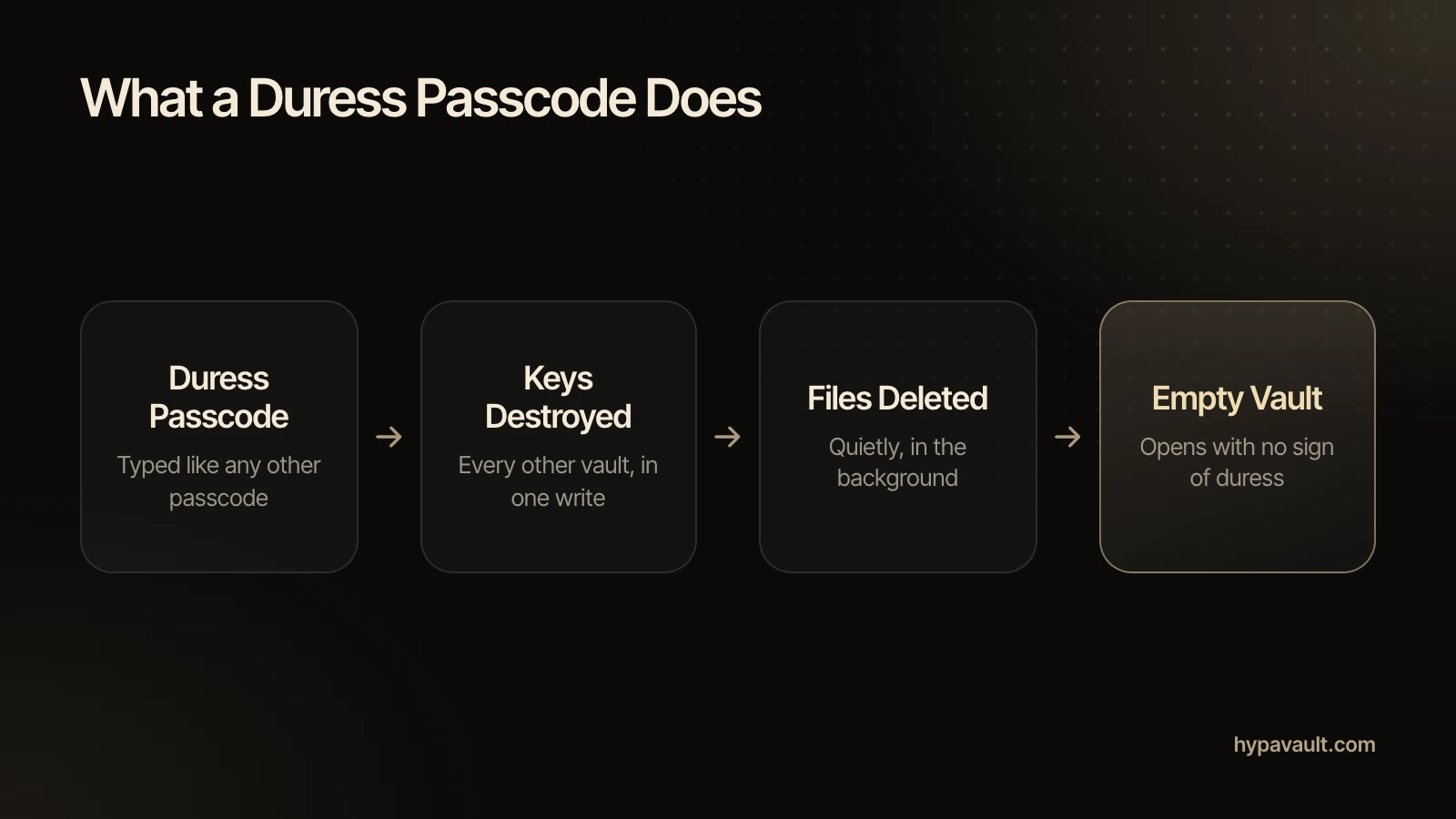
- The lock screen accepts it like any other passcode. Nothing on screen looks different.
- In one silent step, HypaVault destroys the keys of every other vault on the phone. Without those keys, nobody can decrypt their files again.
- HypaVault then deletes the files in the background.
- The empty vault opens, showing no sign of duress.
Technically, one write overwrites every other vault's key slot with random bytes. HypaVault keeps four key slots on every phone, and they look identical whether they're used or not. So nothing on the phone points to the vaults that were there. The security page covers the details.
Erase or Decoy: Why the Vault Is Empty
Some tools offer a decoy instead of an erase. In crypto, BIP39 passphrases work this way: every passphrase opens a valid wallet, but only the right one opens yours. The real wallet survives, hidden behind a different input.
HypaVault takes the other approach. There's no decoy setting to fill; the vault it opens is empty. Once the keys are gone, nobody can open the erased vaults on that phone, including you if the pressure continues later. The trade-off is plain: your backups become the only way back.
When a Duress Passcode Makes Sense
A duress passcode fits moments when refusing isn't safe and someone wants into HypaVault specifically. Think of a robbery, a controlling partner or relative, or anyone who already knows the vault exists. It works best alongside the other layers, each of which covers a different risk.
| Protection | Helps When | Doesn't Help When |
|---|---|---|
| Phone passcode | Someone finds or steals a locked phone | You're made to unlock it |
| Stolen Device Protection on iPhone | A thief knows your passcode and the phone is away from familiar places | You're the one being made to unlock |
| Stealth Mode | Someone glances at your apps and sees a calculator or clock | Someone already knows the vault is there |
| Additional Vaults | You keep parts of life apart, with none showing the others | Someone insists on a vault they know about |
| Duress passcode | You're forced to open HypaVault | It's typed by mistake, or you have no backup |
For the disguise layer, see how a calculator vault works. For separate vaults that stay invisible to each other, see Additional Vaults.
A Robbery or Mugging
Your safety comes first, so hand over what's demanded. A duress passcode lets you do that without exposing what's inside HypaVault. To the person watching, the app simply opens.
A Controlling Partner or Relative
Someone close to you may know your habits and notice an empty vault. Apple's Personal Safety User Guide makes the same point about any change to a phone: others may notice changes to sharing or access. It also suggests recording suspicious activity first.
So if a vault holds evidence you may need later, keep a backup somewhere the other person can't reach. The erase removes it from the phone, but the backup keeps it.
Someone Who Already Knows the Vault Exists
Stealth Mode stops helping once someone knows the calculator is really a vault. That's the moment a duress passcode is for.
When Not to Use It: Border Crossings
A border is the clearest case for leaving a duress passcode alone. U.S. Customs and Border Protection says travelers must present devices in a condition that allows examination. CBP can detain a device it can't inspect.
The EFF's border guide advises travelers to be courteous and not to lie. It also warns that unusual precautions may make agents suspicious, and wiping data in front of an officer is about as unusual as it gets. The guide dates from 2018 and rules differ by country, so check current advice before you travel.
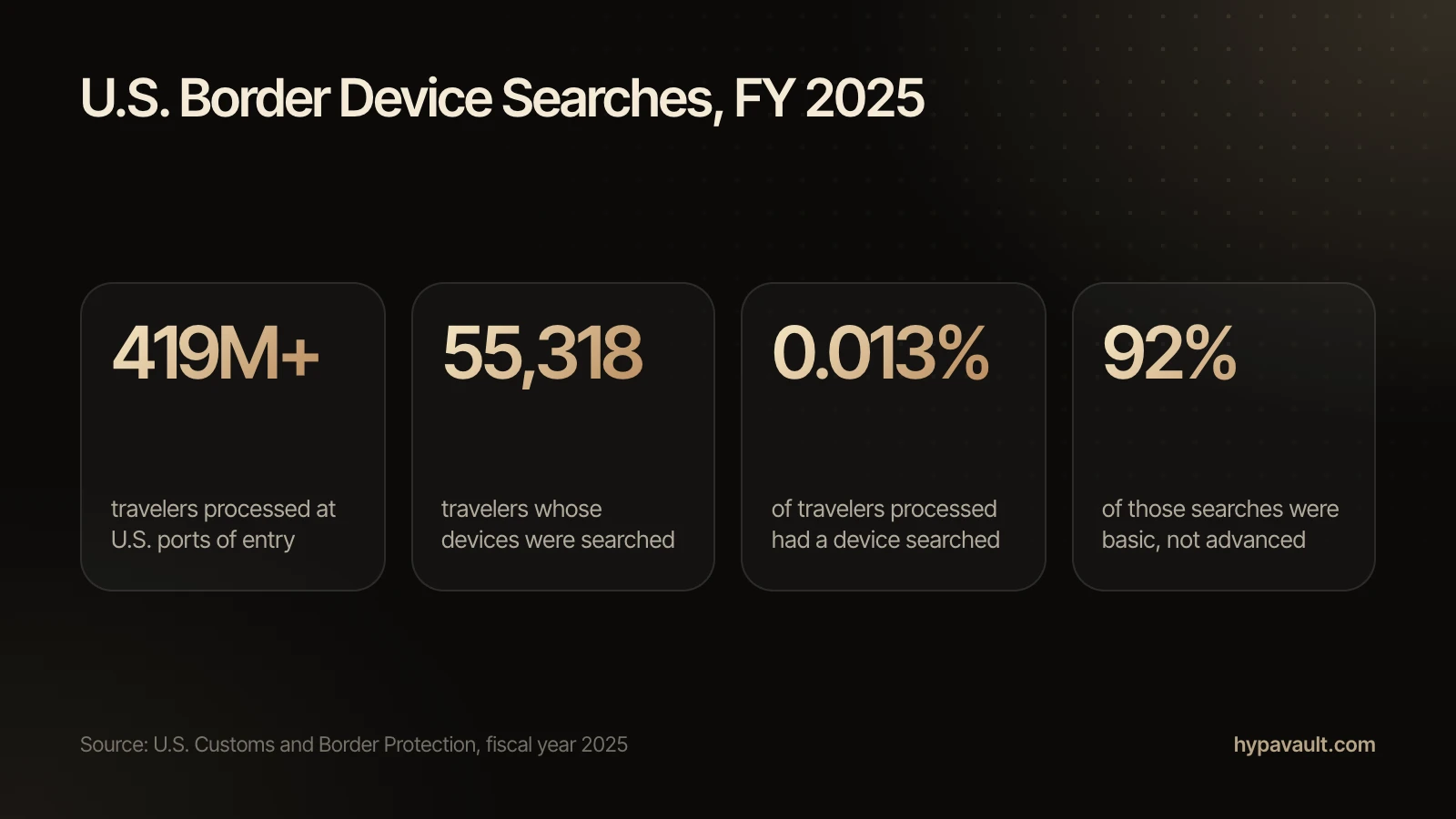
Device searches are rare, though. In fiscal year 2025, CBP searched the devices of 55,318 travelers out of more than 419 million it processed. Most of those were basic searches.
A Safer Plan for Travel
The EFF suggests carrying less data across the border instead. HypaVault lets you do that openly:
- 1Before you leave, tap Back Up Now and save the .hypa file somewhere off the phone.
- 2Delete the files you won't need on the trip. Deleting in HypaVault is permanent, so make the backup first.
- 3After the trip, choose Restore from Backup and enter the vault's recovery phrase. Restore adds back what's missing.
How to Prepare Before You Turn It On
A duress passcode is only as safe as your backups. Put these in place before you rely on it.
- 1Back up every vault with Back Up Now and keep each file off the phone.
- 2Write each vault's 12-word recovery phrase on paper, and keep it apart from the backups.
- 3Choose a duress passcode that's nothing like your everyday passcode.
- 4Back up again when HypaVault reminds you. The reminder appears once your last backup is more than 14 days old.
The code itself takes some thought. It should be one you'd never type by habit but can still recall when your hands are shaking. Avoid your everyday passcode with one digit changed, since a slip of the thumb could trigger it. Rehearse it in your head, never on the phone.
The guide Prepare a Duress Passcode Before You Need It walks through each step.
Getting Your Vaults Back Afterwards
Erasing is permanent on the phone, but your backups still work. To restore an erased vault, choose Restore from Backup, pick its .hypa file and enter that vault's recovery phrase. Restore adds back what's missing and removes nothing.
You get back what the vault held when you made the backup. Anything added since then is gone, which is why a regular backup routine matters as much as the duress passcode itself.
What a Duress Passcode Can't Do
- It erases HypaVault's other vaults, not the rest of your phone. Your messages, photo library and other apps stay as they are.
- It can't stop anyone who has your recovery phrase from opening your backups.
- It can't protect against malware on the phone or someone watching your screen.
- It can't undo itself. Only a backup brings an erased vault back.
If Pro ends, an existing duress passcode keeps working, so the protection you set up stays in place.
References
- 1.BIP39: Mnemonic code for generating deterministic keys · Bitcoin Improvement Proposals (GitHub)
- 2.About Stolen Device Protection for iPhone · Apple Support
- 3.Safety considerations (Apple Personal Safety User Guide) · Apple Support
- 4.Border Search of Electronic Devices at Ports of Entry · U.S. Customs and Border Protection
- 5.Things to Consider When Crossing the U.S. Border · Electronic Frontier Foundation, Surveillance Self-Defense

About the Author
Siddharth Pereira · Co-Founder, Product
Siddharth Pereira co-founded the company behind HypaVault and runs its product roadmap. He has spent more than 18 years building digital products, with a focus on product strategy and product management. Here he writes about how phone privacy works in practice: encryption, backups and the settings that matter.