

Key Takeaways
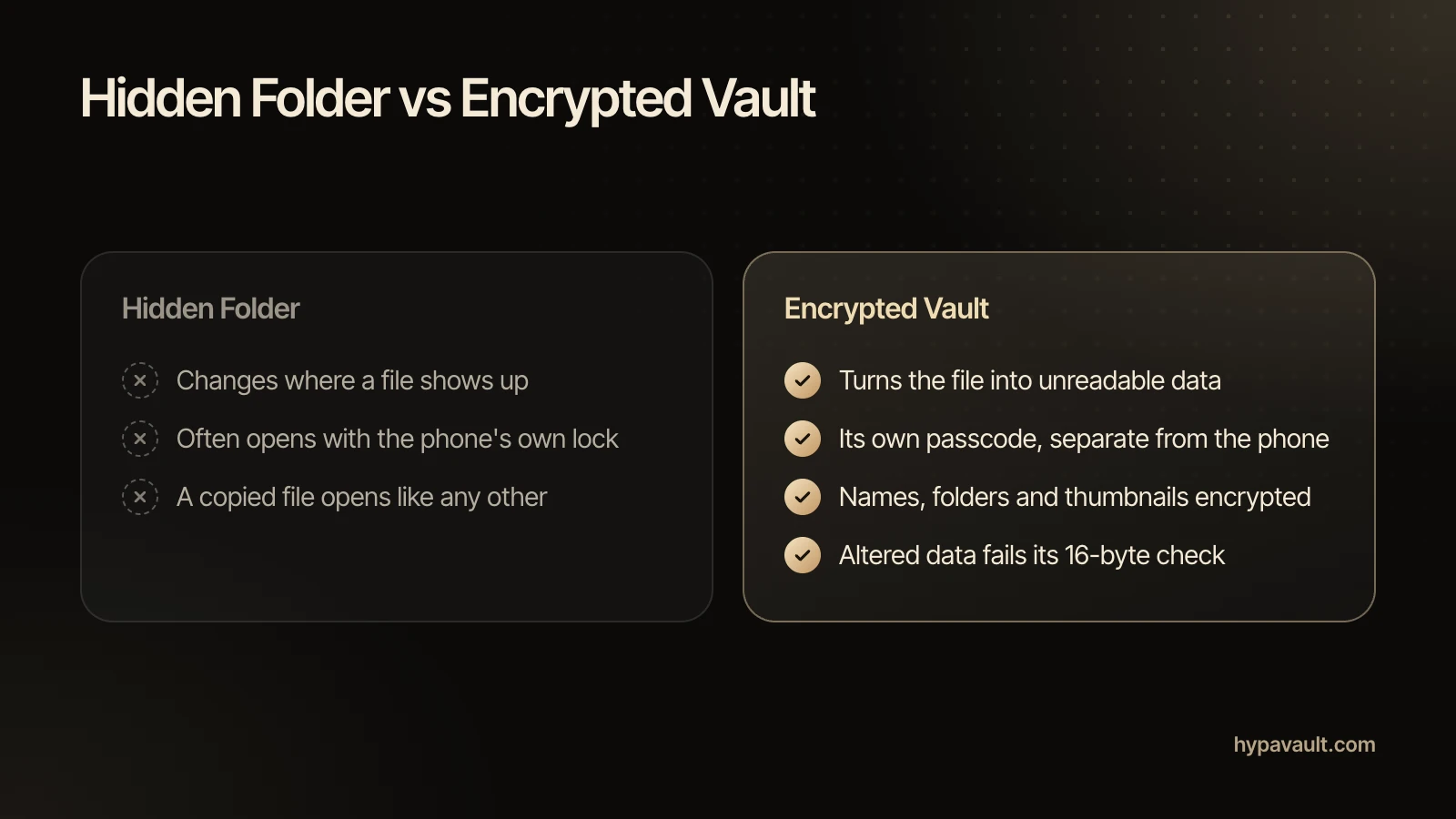
- A hidden folder changes where a file shows up, while an encrypted vault turns the file itself into data that can't be read without a key.
- The iPhone Hidden album and the Google Photos Locked Folder open with your phone's own lock, so anyone who knows your phone passcode can usually get in.
- Your phone's own encryption keeps files sealed until you unlock it; once you have, a hidden file is as readable as any other.
- HypaVault encrypts every file, name, folder, note and thumbnail with AES-256-GCM on the phone, behind a passcode that's separate from your phone's.
- No vault can stop malware or someone watching your screen, and importing a photo doesn't delete the original from your gallery.
In This Post
The hidden folder vs encrypted vault question comes down to one thing: does the file itself change? A hidden folder only changes where a file shows up. An encrypted vault turns the file into data nobody can read without the key. That difference decides who sees your photos when someone else is holding your phone.
Below, I'll cover what the hiding tools on iPhone and Android really do. I'll also show where your phone's own encryption stops, and how HypaVault's encryption works underneath. Then you'll get five questions to ask before you trust any vault app.
What Does a Hidden Folder Actually Do?
A hidden folder keeps files out of the places people usually look: your gallery grid, search and albums. The files themselves stay exactly as they were. Each phone has its own version, and each one stops at a different point.
The iPhone Hidden Album
On iPhone, you can hide photos in the Hidden album. They leave your library and appear only there. Since iOS 16, Apple locks that album by default, so Photos asks for Face ID or Touch ID before it opens. With iCloud Photos on, a photo you hide on one device is hidden on your others too.
That lock is your phone's own unlock, though. So anyone who knows your iPhone passcode, or watched you type it, can usually open the album as well.
The Google Photos Locked Folder
Google Photos offers a Locked Folder protected by your device screen lock. Its items don't appear in the Photos grid, memories, search or albums, and other apps on the phone can't reach them. Still, Google says the folder opens with the same screen lock as the phone itself.
Backup is a separate choice. If backup for the folder is off, its items live only on that phone. Google also warns that they're deleted if you uninstall Photos, clear its data or factory reset the phone.
Android Folders with a .nomedia File
Some Android apps and tips hide a folder by adding a file named .nomedia. According to Android's developer reference, that file tells the media scanner to ignore media in the folder and its subfolders. It exists to keep app graphics out of the Gallery. It doesn't lock or change anything, so a file manager or a computer still opens those files normally.
Isn't My Phone Already Encrypted?
Yes, and that protection is real, but it has a limit. Modern iPhones encrypt their storage by default. Android phones that launched with Android 10 or later must use file-based encryption. Their main storage opens only after you unlock the phone.
The limit is the unlock. Apple's Data Protection classes explain that the default class for app data keeps its key in memory even after the phone locks. That class mainly guards against attacks that involve a reboot. In other words, once you've unlocked your phone, a hidden file is as readable as any other file.
That's the real gap between a hidden folder and an encrypted vault. The vault adds a second lock with its own key, so its files stay encrypted while the phone is in use.
What an Encrypted Vault Changes
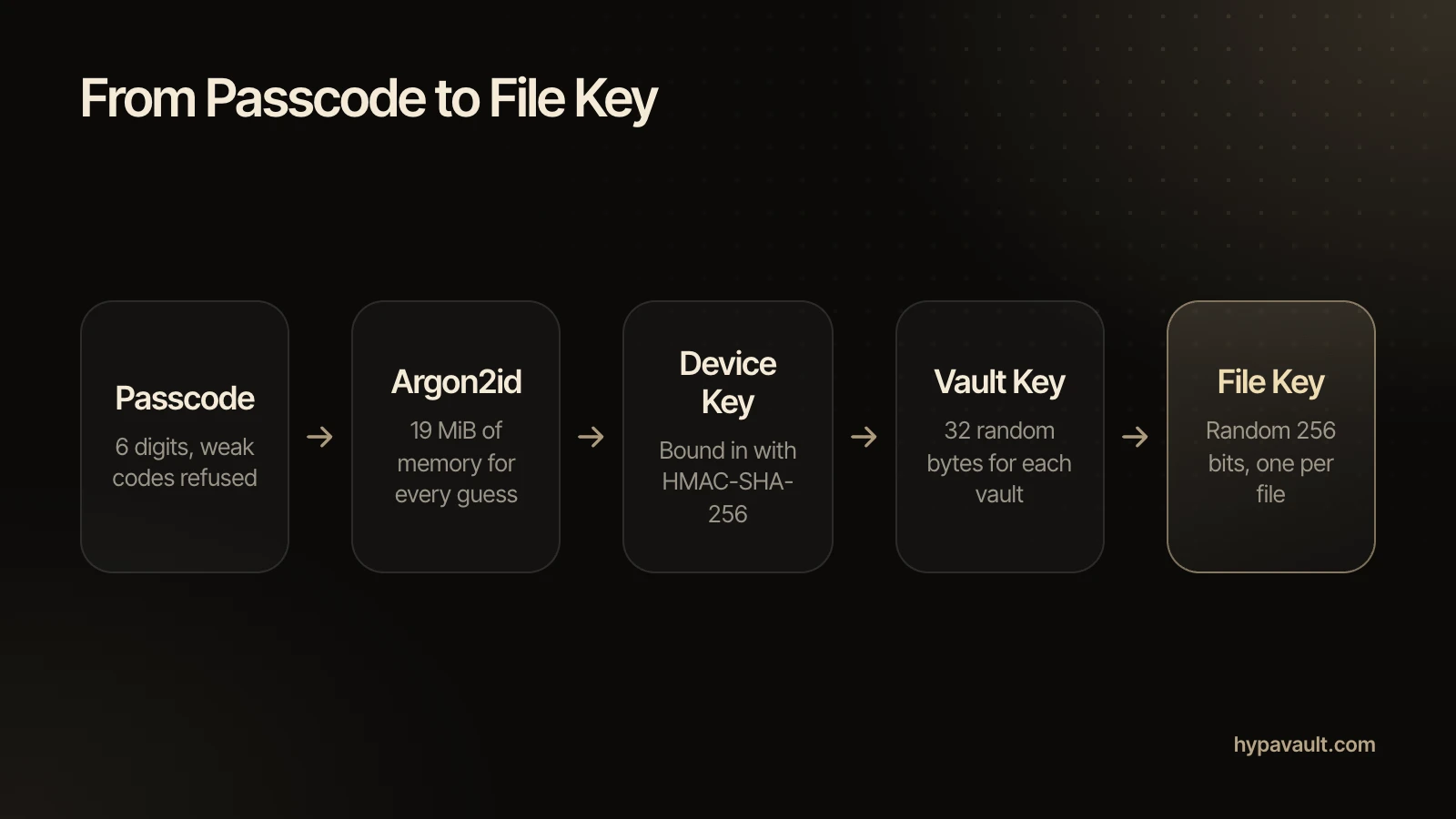
Unlike a hidden folder, an encrypted vault stores files as encrypted data. It decrypts them only after you enter its own passcode. HypaVault encrypts every file, name, folder, note and thumbnail on the phone before saving it. Each vault has its own random 256-bit key, and every file gets its own key too.
The Cipher: AES-256-GCM
HypaVault uses AES-256-GCM, which is AES with a 256-bit key in Galois/Counter Mode. NIST's SP 800-38D defines GCM as authenticated encryption. In practice, each encrypted piece carries a 16-byte tag. If the data has been altered or damaged, it fails to decrypt instead of opening as garbage.
The Lock: Your Passcode and a Device Key
Your 6-digit passcode is the lock, but six digits alone would be quick to try in bulk. So HypaVault stretches the passcode with Argon2id, using 19 MiB of memory for every guess. Then it binds the result to a device key in the phone's secure storage. That's the iOS Keychain, or a key protected by the Android Keystore.
That device key never goes into iCloud, computer or Google backups. As a result, a copy of the vault's files lifted from a backup isn't enough to start guessing. On the phone itself, 5 wrong tries trigger a 30-second wait, which doubles after each miss, up to 1 hour.
Hidden Folder vs Encrypted Vault, Side by Side
Here's how a hidden folder and an encrypted vault compare on the questions that matter when someone else has your phone.
| Question | Hidden Folder | Encrypted Vault |
|---|---|---|
| What changes? | Where the file shows up | The stored file, which becomes unreadable data |
| What opens it? | Often the phone's own passcode, face or fingerprint | A separate 6-digit passcode for each vault |
| Someone knows your phone passcode | They can usually get in | They still need the vault's passcode |
| Names and thumbnails | Left as they are, since hiding doesn't encrypt them | Encrypted too, and decrypted only as you scroll |
| Its files, copied elsewhere | Open like any other file | Stay encrypted without the key |
Why Names and Thumbnails Matter
A vault can encrypt your photos and still leak a lot. A file called passport-scan.pdf tells a story without being opened. A grid of small previews can show nearly as much as the photos themselves.
So ask what else an app encrypts. HypaVault covers file contents and thumbnails, every name (files, folders, notes and vaults), notes and seed words, folder structure and settings. It even encrypts your plan and item counts. Thumbnails are decrypted only as they scroll into view, so the grid never sits on the phone in readable form.
None of that gets in your way once the vault is open. The encrypted file manager still gives you nested folders, sorting and search by name.
Where Your Files Live Matters Too
Encryption only helps if your files stay where you put them. Many vault apps ask you to sign up, then upload your files to their own servers.
HypaVault works with just a passcode, and there's no HypaVault server for your files to reach. Files leave the phone only when you choose to send them. That means a backup file you save, a copy for your other phone, or a shared copy you hand over. HypaVault encrypts every backup on the phone first, so you can keep encrypted backups wherever you choose.
Importing Doesn't Remove the Original
Moving a photo into any vault really means copying it. After an import, HypaVault offers to remove the originals and explains how, but you delete them yourself in your Photos app. Recently Deleted and any cloud photo backup may still hold copies, as the photo import steps explain.
For the full cleanup on both platforms, see how to hide photos on iPhone and Android.
Five Questions to Ask Any Vault App
These questions tell a hidden folder from an encrypted vault in a few minutes. Ask them before you trust any app with private files; a careful app answers them plainly on its own website.
- Are the files encrypted, or only hidden behind a lock screen?
- Does it encrypt names, folders and thumbnails, or only file contents?
- Does the vault have its own passcode, separate from the phone's?
- Where are the files stored, and do I have to sign up?
- Can I make a backup I control, and keep my files if I stop paying?
In HypaVault, everything you've stored stays viewable and exportable on any plan, even after a subscription ends. For a wider check of your phone's own settings, run the free Phone Privacy Audit.
What No Vault Can Do
Encryption protects stored files, and that's all it promises. Neither a hidden folder nor an encrypted vault can stop malware on the phone, or someone watching the screen while the vault is open. A file you share out of the vault leaves as a normal, unprotected copy. And on iPhone, iOS doesn't let apps block screenshots.
One more limit is deliberate. If you lose both your passcode and your recovery phrase, nobody can open the vault, including the people who built it. That's the trade-off for keys that only you hold.
References
- 1.Hide photos on your iPhone, iPad, Mac, or Apple Vision Pro with the Hidden album · Apple Support
- 2.Hide sensitive photos & videos in Locked Folders · Google Photos Help
- 3.MediaStore.MEDIA_IGNORE_FILENAME · Android Developers
- 4.File-based encryption · Android Open Source Project
- 5.Data Protection classes (Apple Platform Security) · Apple Support
- 6.SP 800-38D: Recommendation for Block Cipher Modes of Operation: Galois/Counter Mode (GCM) and GMAC · NIST

About the Author
Siddharth Pereira · Co-Founder, Product
Siddharth Pereira co-founded the company behind HypaVault and runs its product roadmap. He has spent more than 18 years building digital products, with a focus on product strategy and product management. Here he writes about how phone privacy works in practice: encryption, backups and the settings that matter.